AI chart analysis on the chart you are on.
Atlas is the AI built into the ChartLabs chart. Ask what you are looking at and it reads the bars, the indicators and the levels, explains the setup in plain English, and draws the support and resistance it found right on your chart. It never places trades.
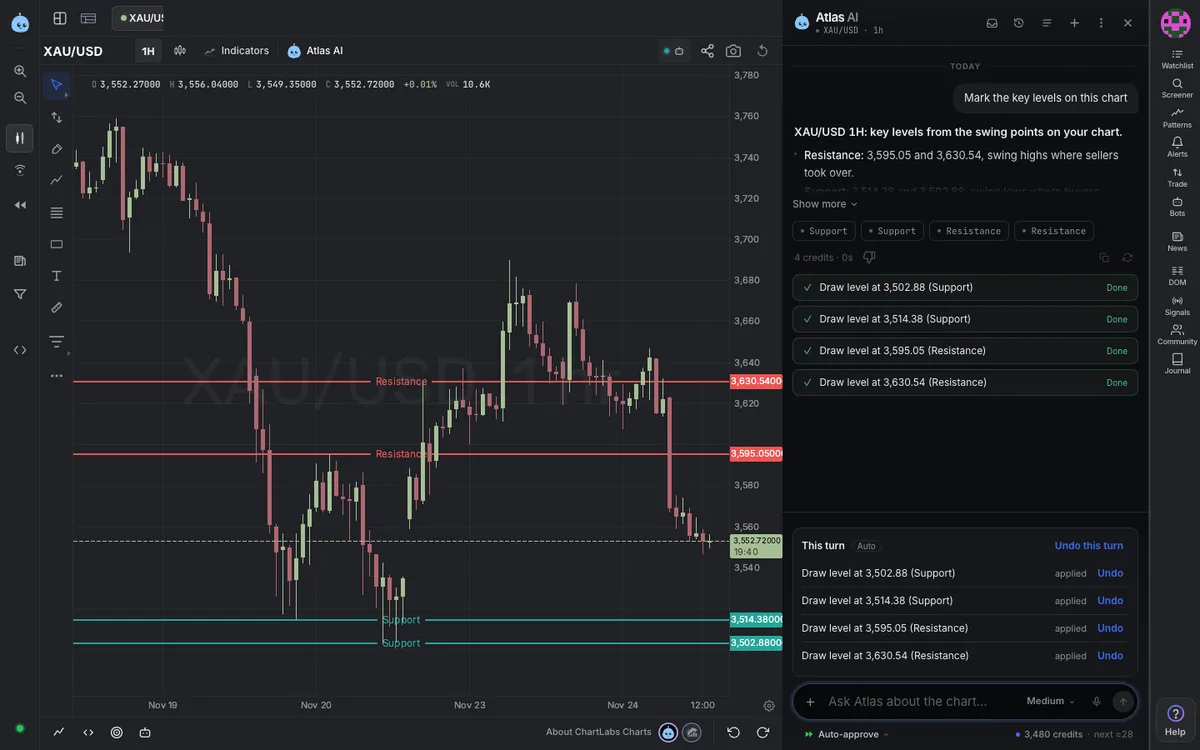
Demo: the app and chart are real (XAU/USD 1H, live data). The Atlas reply is a scripted example; the app drew each level on real swing points.
What Atlas does for you.
Reads the chart
Ask "what is the setup here?" and Atlas answers from the actual bars on your screen: trend, key levels, momentum and what would change its read.
Draws support and resistance
Say "draw support and resistance". Atlas works the levels out from price, then draws them, each with an Undo button.
Adds and tunes indicators
Ask for MACD, set RSI to 21 or have it explain an indicator you do not know. It picks from 350+ indicators.
Sets alerts
"Alert me when BTC crosses 100,000" creates the alert right away. Ask it to list or delete alerts too.
Builds indicators
Describe an idea and Atlas writes it as a CodeLab indicator you can edit, or turns an indicator into a strategy to backtest.
Stays on your side of the line
Atlas can read your broker positions and orders, but it never places, changes or closes an order, and it does not give financial advice.
A second pair of eyes before you click.
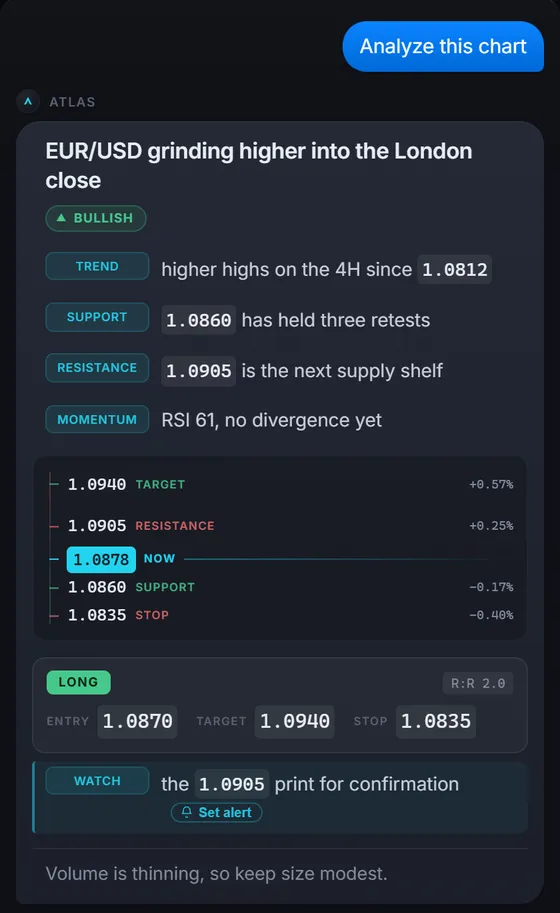
You have a chart open and a trade idea. Ask Atlas for a read. It comes back with the trend, the support and resistance it sees, where momentum sits and the price that would prove the idea wrong. The levels it mentions are numbers from your chart, not a generic template.
Want more depth? Choose Full analysis from the Atlas menu for a longer read, or right click any area of the chart and pick Ask Atlas about this area to question one swing, one wick or one gap.
Set up a chart by asking for it.
Switching timeframes, adding three indicators, drawing a Fib and setting an alert is a dozen clicks. With Atlas it is one sentence: "switch to 4H, add VWAP and RSI, draw a Fib from the last swing low and alert me at the high". Atlas does each step on the chart and lists what it changed.
Anything destructive waits for you. Atlas asks before it deletes an alert, a drawing or a watchlist symbol, and before it clears a chart. Every level and drawing it adds can be undone in one tap.
Ask your first question.
- 1Open a free chart and pick a symbol and timeframe.
- 2Select Atlas AI in the top bar of the chart, or press Ctrl+Space.
- 3Type a question, or start with a button: Take screenshot of chart, Brainstorm ideas, Build indicator.
- 4Read the answer, keep the levels you like and undo the rest.
Atlas docsOrder flow toolsBacktestingEverything Atlas can do
FAQCommon questions.
Is Atlas AI chart analysis free?
Yes. Atlas on the Medium tier is part of the Free plan, which includes monthly AI credits. Ultimate adds the High, Max and Ultra tiers, more credits and chart auto-scan. You need a free account so Atlas can save your chats.
Does Atlas place trades for me?
No. Atlas never places, changes or closes orders. It can read your positions and orders on a connected broker so it can talk about them, but every trade is yours to place.
Is Atlas financial advice?
No. Atlas explains and organises what is on your chart. It does not tell you to buy or sell and it does not give financial advice. Treat its read as one more input.
What markets can Atlas analyse?
Any chart you can open on ChartLabs: crypto, US stocks and ETFs, forex and gold, on any timeframe. Atlas reads the bars and indicators on your screen, so it works on whatever you are looking at.
Can Atlas draw on my chart?
Yes. It draws support and resistance, trendlines and Fib retracements, adds and tunes indicators, sets alerts and changes the timeframe, symbol or chart type. It asks before it deletes anything.
Can Atlas build a custom indicator?
Yes. Describe the indicator and Atlas writes it in CodeLab, where you can read and edit the code. It can also turn an indicator into a strategy for the Strategy Tester.
Ask Atlas about your chart.
Free with a ChartLabs account. Open a chart, press Ctrl+Space and ask.
Atlas is an AI assistant and can be wrong. It does not give financial advice and never places orders. Trading involves risk of loss. Risk disclosures.